Posted on Leave a comment

GIGABYTE B850 vs Z890 Motherboard: AMD or Intel — Which Platform Is Right for You?

When people search “B850 vs Z890 motherboard,” the most important thing to clarify first is this: these are not competing options within the same platform. B850 is AMD’s mid-to-high-end chipset for Ryzen 9000 series processors on the AM5 socket. Z890 is Intel’s flagship chipset for Core Ultra Series 2 processors on the LGA1851 socket. Choosing between them means choosing between AMD and Intel entirely.

This comparison helps you understand which platform — and which GIGABYTE lineup — makes the most sense for your specific needs in 2025.


Platform Overview

GIGABYTE B850 (AMD)GIGABYTE Z890 (Intel)
SocketAM5LGA1851
CPU PlatformAMD Ryzen 9000 SeriesIntel Core Ultra Series 2
DDR5 SupportYes (up to 8200 MHz OC)Yes (up to 9500 MHz OC)
PCIe 5.0Yes (1x M.2 + GPU slot)Yes (more lanes available)
Wi-Fi 7Yes (AORUS Elite variant)Yes
OverclockingMemory only (B850)Full CPU + Memory (Z890)
AM5 LongevityAMD committed through 2027+LGA1851 current gen
Starting PriceLowerHigher

Key Difference 1: CPU Overclocking

This is the most significant functional difference between the two chipsets. Intel’s Z890 supports full unlocked CPU overclocking — you can push Core Ultra 200S processors beyond their base boost limits using the Z890’s robust VRM configurations and BIOS overclocking controls.

AMD’s B850 chipset does not support CPU overclocking for Ryzen 9000 processors. You can overclock memory (DDR5 via EXPO), but CPU frequency management is handled by AMD’s Precision Boost algorithm automatically. If you want CPU overclocking on AMD, you need the X870E chipset.

Verdict: Z890 wins for CPU overclockers. B850 is fine for gamers who let AMD’s auto-boost do its job.

Key Difference 2: PCIe Lane Allocation

Intel Z890 provides more total PCIe 5.0 bandwidth from the chipset, giving you more M.2 Gen 5 slots and more flexibility for high-speed storage configurations. GIGABYTE’s Z890 AORUS Elite WiFi7 ships with four M.2 slots, including PCIe 5.0 for the primary slot.

The GIGABYTE B850 AORUS Elite WiFi7 offers three M.2 slots with one PCIe 5.0 slot. For most users, three M.2 slots is more than sufficient — but if you are building a storage-intensive workstation, Intel’s Z890 offers more room to expand.

Key Difference 3: Platform Longevity

AMD has publicly committed to AM5 socket support through at least 2027, with future Ryzen generations confirmed for the platform. This means a B850 motherboard purchased today will accept next-generation AMD processors without requiring a board swap.

Intel’s LGA1851 platform is newer and the roadmap beyond Core Ultra Series 2 is less publicly confirmed. Historically, Intel has shorter platform support windows than AMD, though this varies by product generation.

Verdict: AMD B850 wins for platform longevity and upgrade path value.

Key Difference 4: Gaming Performance

In pure gaming benchmarks, Core Ultra 200S and Ryzen 9000 trade blows depending on the title. At 1080p and 1440p, the differences between a Ryzen 9 9900X on B850 and a Core Ultra 9 285K on Z890 are generally within a few percentage points either way. The GPU, not the CPU platform, dominates gaming frame rates at these resolutions.

For gaming-only builds, platform choice matters less than budget allocation. Spending less on the motherboard (B850 vs Z890) and putting that savings toward a better GPU almost always produces a bigger gaming performance gain.

Key Difference 5: Price

GIGABYTE B850 AORUS motherboards are priced lower than their Z890 AORUS equivalents at every tier. The B850 AORUS Elite WiFi7 comes in below the Z890 AORUS Elite WiFi7, offering nearly the same feature set for AMD Ryzen users at a reduced cost.

For budget-conscious builders, the B850 platform allows you to keep a capable AORUS feature set while saving money that can go toward storage, memory, or GPU upgrades.


Which GIGABYTE Motherboard Should You Choose?

Choose GIGABYTE B850 (AMD AM5) if:

  • You are pairing with AMD Ryzen 9000 series or plan to upgrade to future AM5 CPUs
  • Platform longevity and future CPU compatibility matter to you
  • You want strong DDR5 performance without paying the Intel Z890 premium
  • Gaming is your primary use case and CPU overclocking is not a priority

Choose GIGABYTE Z890 (Intel LGA1851) if:

  • You are pairing with Core Ultra 200S and want full CPU overclocking capability
  • You need maximum PCIe lanes for professional storage or multi-GPU configurations
  • You want the highest DDR5 memory overclocking headroom (up to 9500 MHz)
  • You are building a content creation or AI inference workstation

Both platforms are available at TS Sales Tech with full GIGABYTE warranty coverage. Speak to our team to confirm which CPU you are pairing with — that single decision determines which board lineup is right for your build.
Posted on Leave a comment

GIGABYTE RTX 5070 vs RTX 5080: Which GPU Is Worth Buying in 2025?

NVIDIA’s RTX 50 Series Blackwell GPUs have reset the performance bar for PC gaming in 2025. Two cards generate the most debate among buyers: the RTX 5070 and the RTX 5080. One costs significantly less. The other performs significantly more. But the gap between them is more nuanced than a spec sheet reveals.

Here is a complete, no-nonsense breakdown of RTX 5070 vs RTX 5080 to help you decide which card makes sense for your resolution target, budget, and use case.


Specs Comparison: RTX 5070 vs RTX 5080

SpecificationRTX 5070RTX 5080
ArchitectureBlackwell (GB205)Blackwell (GB203)
CUDA Cores6,14410,752
VRAM12 GB GDDR716 GB GDDR7
Memory BandwidthHighHigher
TDP~250W~360W
MSRP$549$999
DLSS VersionDLSS 4DLSS 4
Ray Tracing CoresGen 4Gen 4 (+75%)

Gaming Performance: The Real Numbers

At 1440p, the RTX 5070 is a genuinely outstanding card. It delivers high-refresh-rate gaming in virtually every major title and handles modern workloads well. The RTX 5080 leads at this resolution, but the gap narrows — in many titles, the performance difference falls below 15%, making the price premium harder to justify.

At 4K, the RTX 5080 asserts itself clearly. Across a broad range of games, the RTX 5080 delivers roughly 17–20% more performance than the RTX 5070 at 4K. For demanding titles with ray tracing enabled at maximum settings, the 5080’s additional CUDA cores and VRAM headroom create a more comfortable experience.

With DLSS 4 Frame Generation, both cards benefit from NVIDIA’s multi-frame generation technology, which can multiply perceived frame rates dramatically. This partially narrows the real-world gap between them for display output, though native rasterization still favors the 5080.


VRAM: Does 12 GB vs 16 GB Matter?

For gaming in 2025, 12 GB of GDDR7 on the RTX 5070 is sufficient for nearly all titles at 1440p. At 4K with maximum texture settings in the most demanding games, 16 GB starts to offer a measurable advantage in frame time consistency.

For creative workloads — video editing, 3D rendering, AI inference locally — 16 GB provides meaningfully more working room, especially with large models or high-resolution assets.

If your primary use is gaming, 12 GB is fine now. If you are future-proofing a workstation or gaming at 4K natively for several years, 16 GB is the safer call.


Power Consumption and System Requirements

The RTX 5080 draws significantly more power — around 360W TDP versus the 5070’s approximately 250W. This has real implications for your build:

  • An 850W power supply handles the RTX 5070 comfortably in most system configurations
  • The RTX 5080 benefits from a 1000W PSU or higher, especially paired with a high-TDP CPU
  • Case airflow requirements are higher for the 5080 due to heat output

If your current case and PSU are not rated for the 5080, factor in those upgrade costs when comparing the true price gap.


Price vs Performance: The Honest Take

The RTX 5080 costs roughly 82% more than the RTX 5070 at MSRP ($999 vs $549). It delivers approximately 20–38% more performance depending on the benchmark and resolution. By any value-per-dollar metric, the RTX 5070 wins decisively.

That said, value metrics do not tell the whole story. If you are gaming at 4K on a high-refresh monitor and want consistent frame delivery without relying entirely on frame generation, the RTX 5080 justifies its price premium. If you are at 1440p, even a maximum-settings build, the RTX 5070 is the rational choice.


GIGABYTE AORUS Versions: Which Card to Get

GIGABYTE produces the RTX 5070 and RTX 5080 under both the AORUS and EAGLE branding. The AORUS Master and AORUS Xtreme variants add larger triple-fan coolers, factory overclocking, and extended heatsink coverage for sustained load performance. For the RTX 5080 specifically, the AORUS cooling design matters — it is a power-hungry chip and thermal headroom translates directly into boost clock stability.


Verdict: RTX 5070 vs RTX 5080

Use CaseRecommendation
1080p or 1440p gamingRTX 5070
4K gaming, maximum settingsRTX 5080
Budget-conscious enthusiastRTX 5070
Content creation / AI workloadsRTX 5080 (16 GB VRAM)
Maximum future-proofingRTX 5080

For most gamers in Thailand building or upgrading a system in 2025, the RTX 5070 delivers the better value. The RTX 5080 is the right card for buyers who game at 4K natively, use their system for professional creative work, or simply want the best GIGABYTE has to offer without compromise.

Both are available through TS Sales Tech. Contact us for current stock and pricing on the full GIGABYTE RTX 50 Series lineup.

Posted on Leave a comment

GIGABYTE AORUS vs ASUS ROG Motherboard: Which Should You Buy in 2025?

If you are building a new PC on Intel’s LGA1851 platform, two brands dominate the conversation: GIGABYTE AORUS and ASUS ROG. Both offer premium Z890 motherboards targeting gamers and enthusiast builders. But they take different approaches — and choosing the wrong one for your use case can cost you either money or performance.

This guide breaks down every key difference between AORUS and ROG Z890 motherboards so you can make the right call.

The Brands at a Glance

GIGABYTE AORUS is GIGABYTE’s enthusiast gaming sub-brand, known for aggressive thermal design, strong VRM configurations, and competitive pricing within the premium segment. The AORUS lineup runs from the accessible Elite WiFi7 all the way to the flagship AORUS Master and the extreme-tier Z890 AI TOP.

ASUS ROG (Republic of Gamers) is arguably the most recognized gaming motherboard brand globally. ROG boards are known for their aggressive styling, extensive software ecosystem (Armoury Crate), and premium build quality. The Z890 ROG lineup spans the ROG Strix series up through the ROG Maximus Extreme.


Head-to-Head: Z890 AORUS Master vs ROG Strix Z890-F

FeatureGIGABYTE AORUS Z890 MasterASUS ROG Strix Z890-F Gaming WiFi
SocketLGA1851LGA1851
ChipsetIntel Z890Intel Z890
Form FactorATXATX
VRM Phases20+1+218+1+2
Max DDR5 Speed (OC)9500 MHz8800 MHz
M.2 Slots54
PCIe x16 Slots32
Wi-FiWi-Fi 7Wi-Fi 7
Thunderbolt 4YesYes
USB 3.2 Gen 2×2YesYes
Price RangeMid-HighMid-High

VRM and Overclocking

For serious CPU overclocking with Core Ultra 200S processors, VRM quality matters more than almost any other spec. The AORUS Master runs a 20+1+2 phase configuration with 80A power stages — giving it substantial headroom for sustained overclocking under load.

The ROG Strix Z890-F runs 18 phases, which is still excellent for mainstream overclocking. Where ASUS tends to have an edge is BIOS polish. ROG’s UEFI interface is widely considered among the most refined in the industry, with granular memory tuning options that experienced overclockers appreciate.

Winner for overclocking: Slight edge to AORUS on raw VRM phases; slight edge to ROG on BIOS tooling.

Memory Performance

This is an area where AORUS pulls ahead clearly. GIGABYTE’s AORUS Z890 boards support DDR5 overclocking up to 9500 MHz, outpacing most ROG Strix equivalents which top out around 8800 MHz on official support. If you plan to run high-speed EXPO or XMP memory kits, AORUS has the broader compatibility window.

Software and Ecosystem

ASUS ships all ROG boards with Armoury Crate — a unified dashboard for monitoring, RGB control, fan curves, and performance tuning. It is well-developed but also resource-heavy and has a history of background process bloat.

GIGABYTE counters with its Control Center software and the newer AI-integrated UC BIOS. GIGABYTE’s Control Center is lighter and more focused, though it covers less ground than Armoury Crate overall.

Winner for software: ASUS ROG for breadth; GIGABYTE for lightweight operation.

Build Quality and Aesthetics

Both brands use reinforced PCIe slots, EZ-release mechanisms for GPU removal, and tool-free M.2 heatsink designs on their 2025 Z890 boards. AORUS leans into a dark angular aesthetic with subtle RGB accents. ROG boards are bolder, with more visible RGB and the signature ROG Eye branding.

For builders who prioritize looks, this comes down to personal preference. For those who want the thermals to back up the looks, AORUS’s physical heatsink coverage on the Z890 Master is notably extensive.

Price and Value

At comparable feature levels, AORUS motherboards typically come in at a slightly lower price than their ROG equivalents. The Z890 AORUS Elite WiFi7, for example, offers most of the features a mainstream enthusiast needs at a price point that undercuts similarly specified ROG Strix models.

If budget optimization matters, AORUS delivers more specification per dollar at every tier. If you value the ROG brand ecosystem and software maturity, the ROG premium is justifiable.


Verdict: AORUS vs ROG — Which Should You Choose?

Choose GIGABYTE AORUS if:

  • You want maximum VRM phases and DDR5 headroom for your budget
  • You prefer a cleaner, lighter software experience
  • You are building a cost-optimized enthusiast system

Choose ASUS ROG if:

  • You are deep in the ASUS ecosystem (GPU, monitor, peripherals) and want unified software control
  • You value BIOS refinement and advanced memory tuning
  • Aesthetics and brand recognition matter to you

Both brands make excellent Z890 motherboards. The AORUS lineup available at TS Sales Tech gives you factory-backed warranty support and local availability — visit the store to see current stock and pricing on the full GIGABYTE AORUS Z890 range.

Posted on Leave a comment

5 GIGABYTE UC BIOS new features you may not know (but will love)

5 GIGABYTE UC BIOS new features you may not know (but will love)

Since its debut with the 600 and 700-series motherboards, GIGABYTE User-centered BIOS (UC BIOS) has been well-received for its sleek interface and user-friendly design. But did you know it’s evolved even further? With the release of the 800-series motherboards, UC BIOS introduces a host of powerful new features that not only enhance performance but also redefine the BIOS tweaking experience. Here are 5 features you might have missed—and will absolutely love.


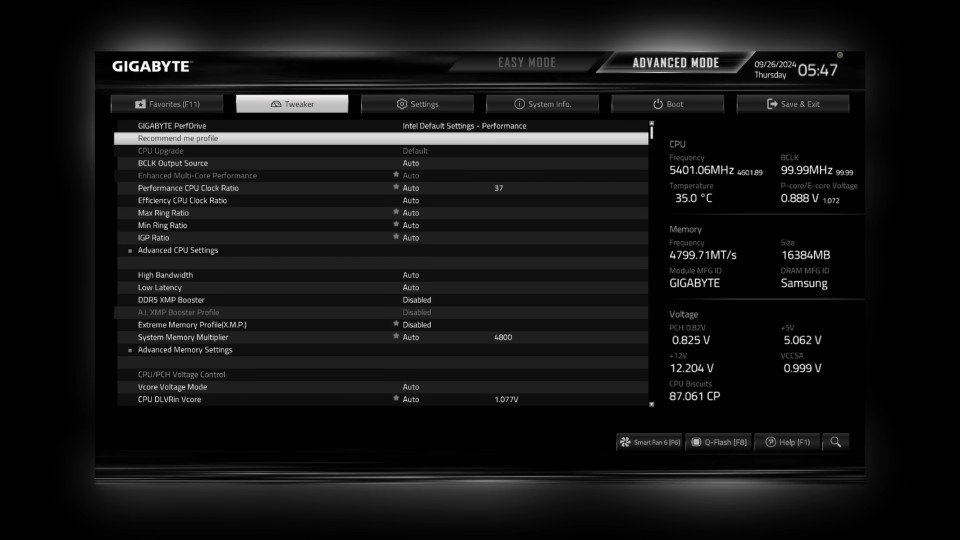
1) Smarter Settings with AI PerfDrive


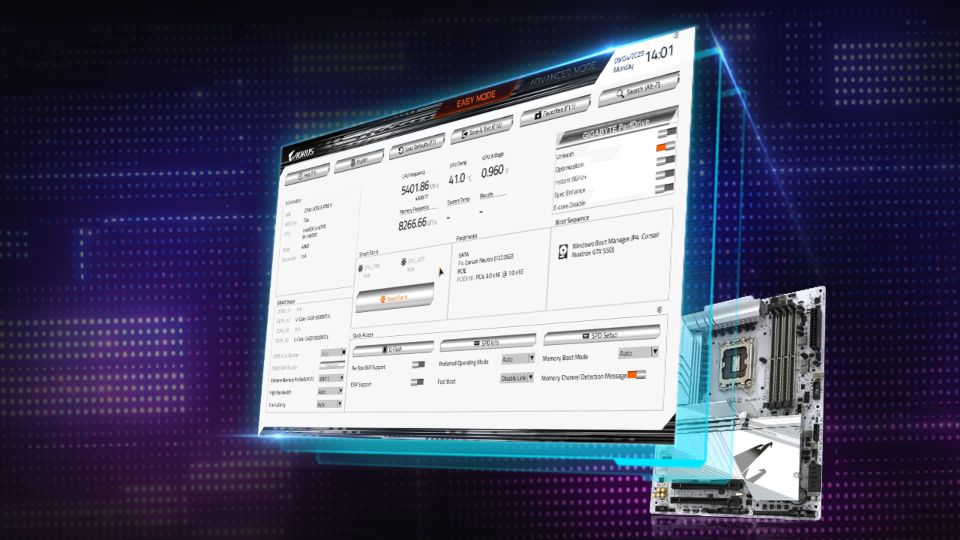
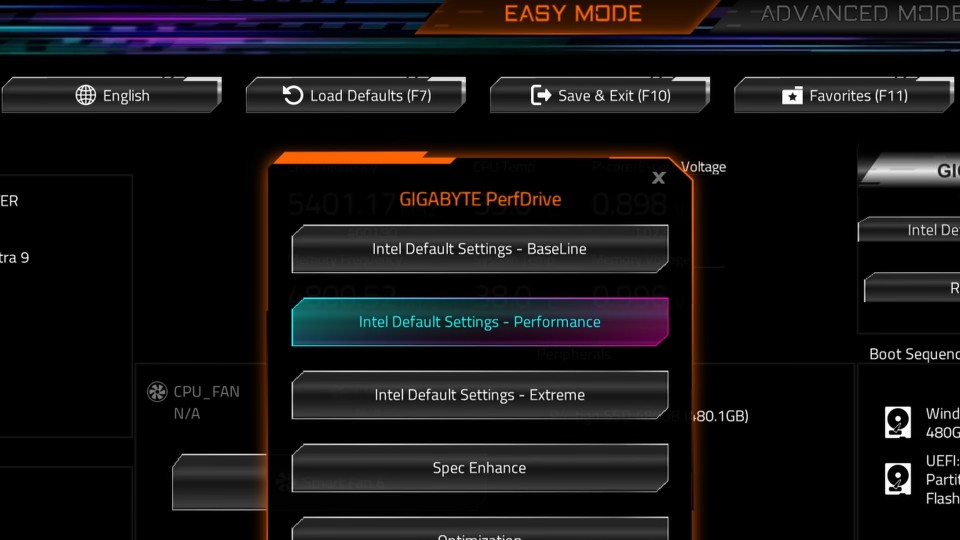
Remember GIGABYTE PerfDrive from the 700 series? It’s been reimagined as AI PerfDrive, a smarter tool that uses intelligent evaluation to recommend the optimal configuration for your system based on its actual thermal performance.


AI PerfDrive analyzes system temperature performance to recommend optimal usage profiles for improved efficiency.


Available on GIGABYTE Z890 series motherboards, AI PerfDrive now includes Intel Default Settings and creates custom profiles tailored to your setup. The standout addition? The “Recommend Me Profile” tool integrates directly into the BIOS. It analyzes your system and suggests the best preset for your configuration. It’s like having a tuning expert built right into your motherboard.


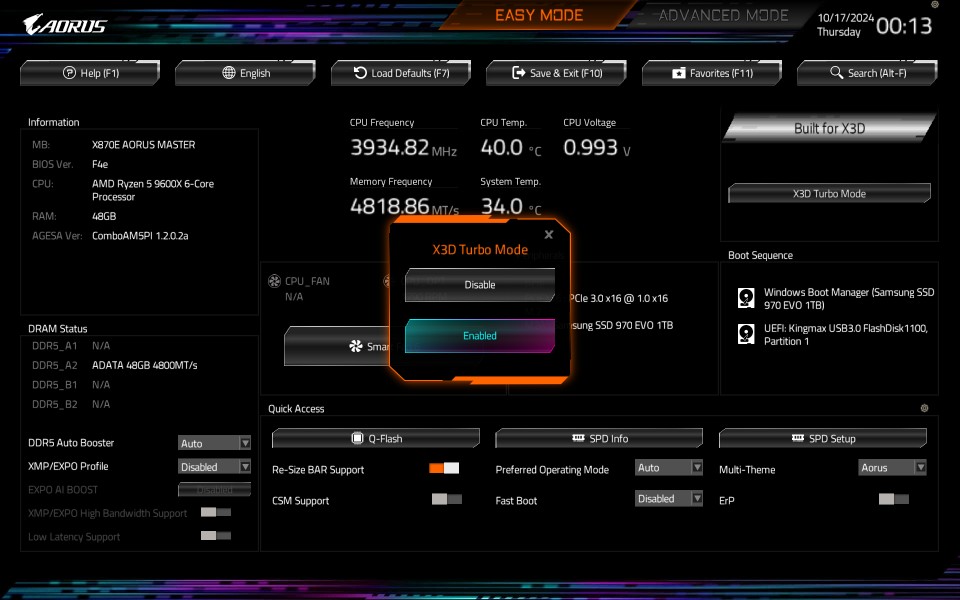
2) More Power Boost with Active OC Tuner & X3D Turbo Mode


Exclusive to GIGABYTE X870E/X870 motherboards, Active OC Tuner dynamically switches between AMD P.B.O. (Precision Boost Overdrive) and Manual OC modes depending on your workload. This ensures maximum performance, delivering up to a 7% boost. For gaming or light tasks, it utilizes AMD P.B.O. to achieve the highest CPU boost clocks. For heavy workloads, it transitions seamlessly to Manual OC mode for full-core performance.


GIGABYTE X3D Turbo Mode boosts Ryzen 9000X3D gaming performance by up to 35% and Ryzen 9000 by up to 20%
 

Are you currently rocking a Ryzen X3D CPU? Get ready for next-level performance with X3D Turbo Mode. Built into X870E/X870 motherboards, this feature optimizes core distribution, bandwidth, and power balancing, delivering up to an 18% performance gain for Ryzen™ 9000 series processors. Whether you’re gaming, this feature will definitely get you ahead of the curve.


3) A Personalized Look with Multi-Theme BIOS


Who says the BIOS interface has to be boring? With the new Multi-Theme Design, you can personalize your BIOS interface to match your aesthetic. Choose from themes like AORUS, AORUS Bright, or the modern and minimalist GrayScale mode.


UC BIOS new grayscale mode provides a clean, distraction-free layout for focused BIOS tuning sessions.
 

The GrayScale mode isn’t just about looks—it’s designed for functionality, offering a clean and distraction-free layout that’s perfect for serious BIOS tuning sessions. This feature brings both style and substance to your BIOS experience.


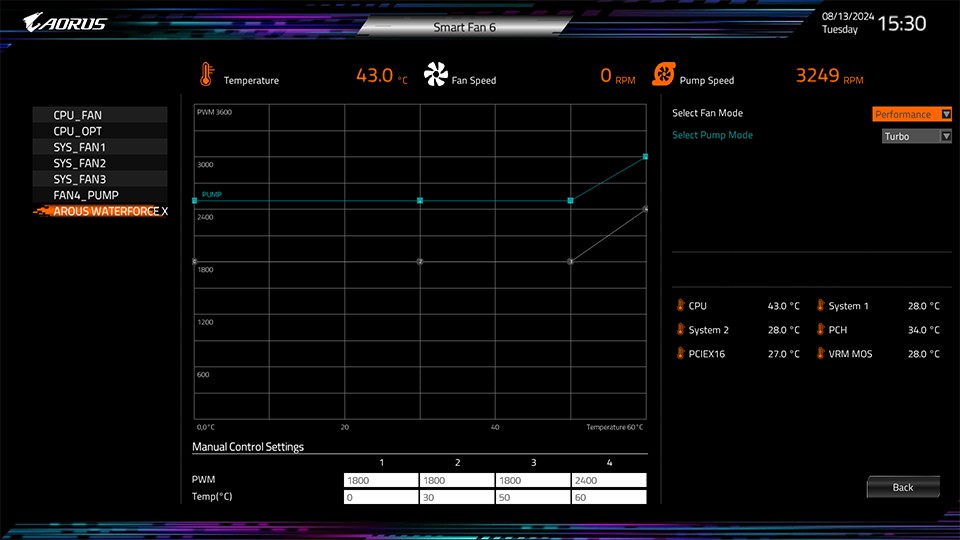
4) Easier Cooling Management with AIO Fan Control


Managing your AORUS AIO CPU cooler’s fan speeds just got a whole lot simpler! The new AIO Fan Control function in UC BIOS lets you adjust fan settings directly from the BIOS, a perfect feature designed for non-Windows users.


AIO Fan Control enables adjustment of AIO fan speeds directly in UC BIOS, ideal for non-Windows users
 

Designed for the AORUS WATERFORCE X II series AIOs, it’s a must-have for anyone putting together an all-AORUS build. Whether you’re going for whisper-quiet operation or chasing peak cooling performance, AIO Fan Control makes fine-tuning your AIO effortless.


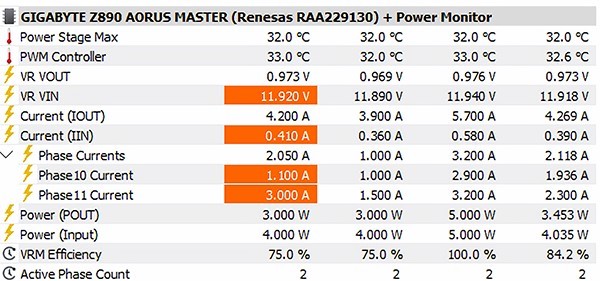
5) Get Deeper Insights with HWiNFO Integration


Our partnership with HWiNFO has reached new heights this time around, bringing advanced monitoring features right to your fingertips. The new Power Monitor* provides real-time insights into CPU Vcore power phase outputs and efficiency, allowing you to closely monitor and optimize your system to ensure the long-term health of your hardware.


Exclusive HWiNFO partnership features Power Monitor for real-time CPU Vcore power phase output and efficiency tracking.


With instant access to comprehensive BIOS details—like toggle statuses and version numbers—you no longer need to reboot your system for critical information. This seamless integration gives you unparalleled control and visibility into your system’s performance.


*This feature is available only on GIGABYTE AMD and Intel 800 series motherboards with Intersil, Onsemi, and Infineon power controllers. Check the User Manual for details.


Explore UC BIOS Today


With each generation, GIGABYTE UC BIOS continues to push boundaries, offering innovative features for both performance enthusiasts and everyday users. Dive into your UC BIOS today and unlock your system’s full potential. The power to optimize and elevate your PC experience is just a few clicks away!